


TL;DR
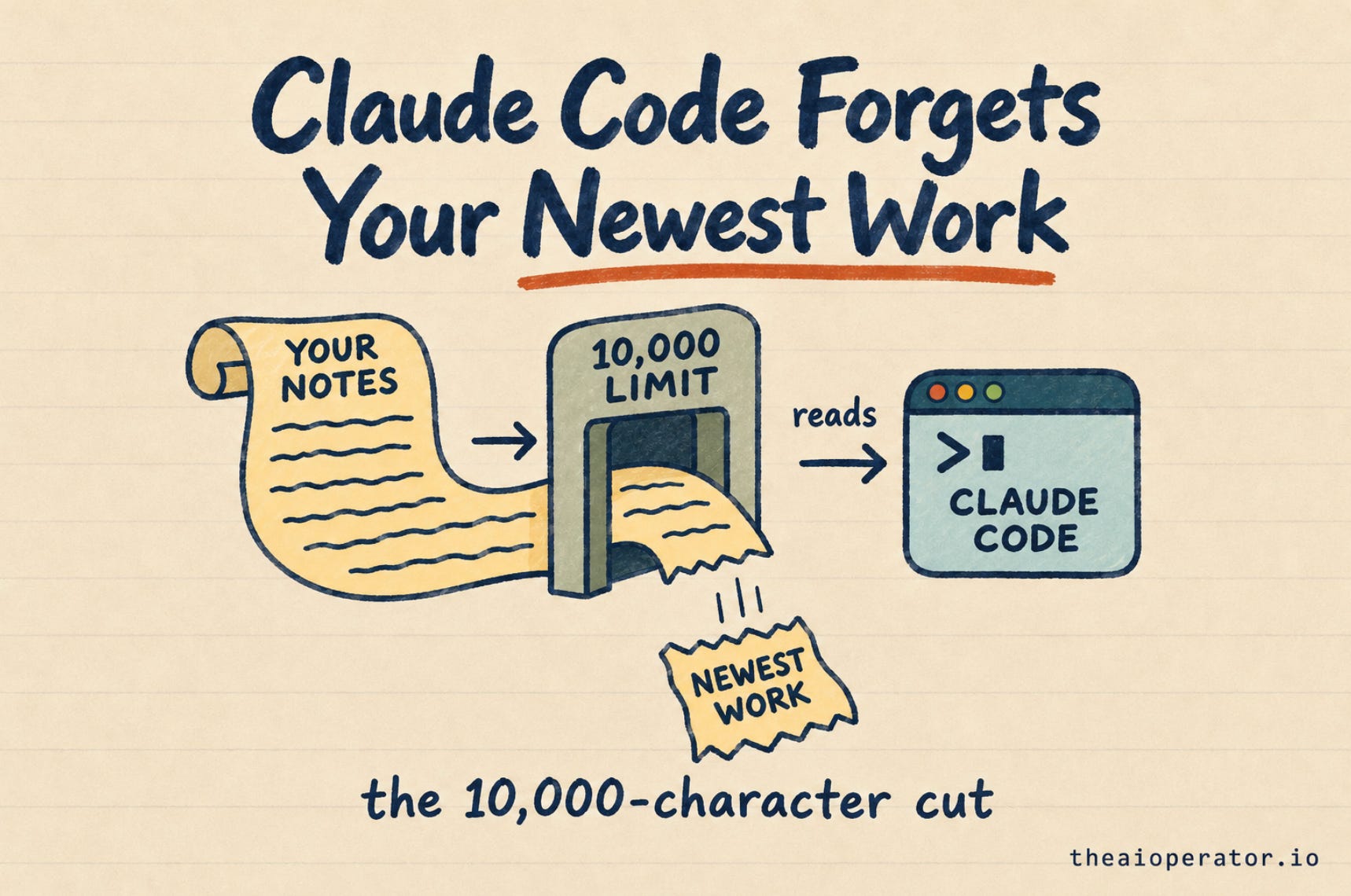
When a Claude Code session starts, hooks can hand it your notes. Past 10,000 characters, Claude gets a short preview and no warning.
My second brain sent 11,970 characters. Old lessons filled the space, and 0 of the 20 newest jobs reached Claude.
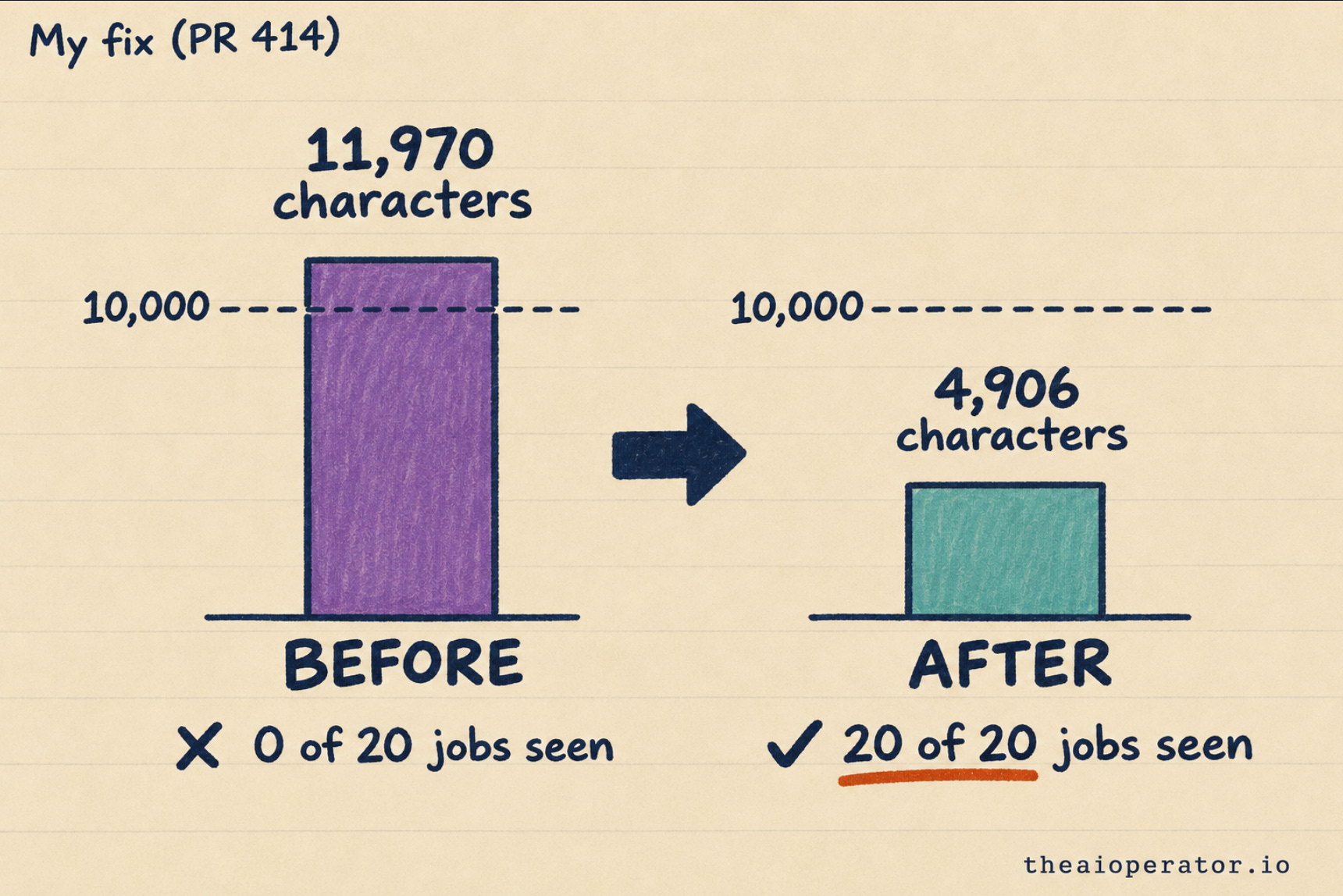
The fix: newest first, drop what’s done, stay under the limit. Now it sends 4,906 characters and all 20 jobs.
Claude Code reads only the first 10,000 characters of what a hook hands it when a session starts.
A hook is a small script that runs at a set moment, like the start of a session. Many memory setups use one to give Claude your notes, your rules or your recent work. Mine does too.
Past the limit, nothing fails and nothing warns you. Claude Code saves the text to a file and shows Claude a short preview. Claude then works as if it has the full picture.
I maintain obsidian-second-brain, an open-source second brain for AI agents with over 5,300 stars on GitHub. Last week a user showed me my own repo was hitting this limit. If you set it up from how to build an Obsidian second brain every AI agent can use, this post is about your setup too.
In AI memory tools lost to search I argued that plain files beat fancy memory tools. Plain files have one weak spot: how much of them reaches the model.
What the 10,000-character limit does
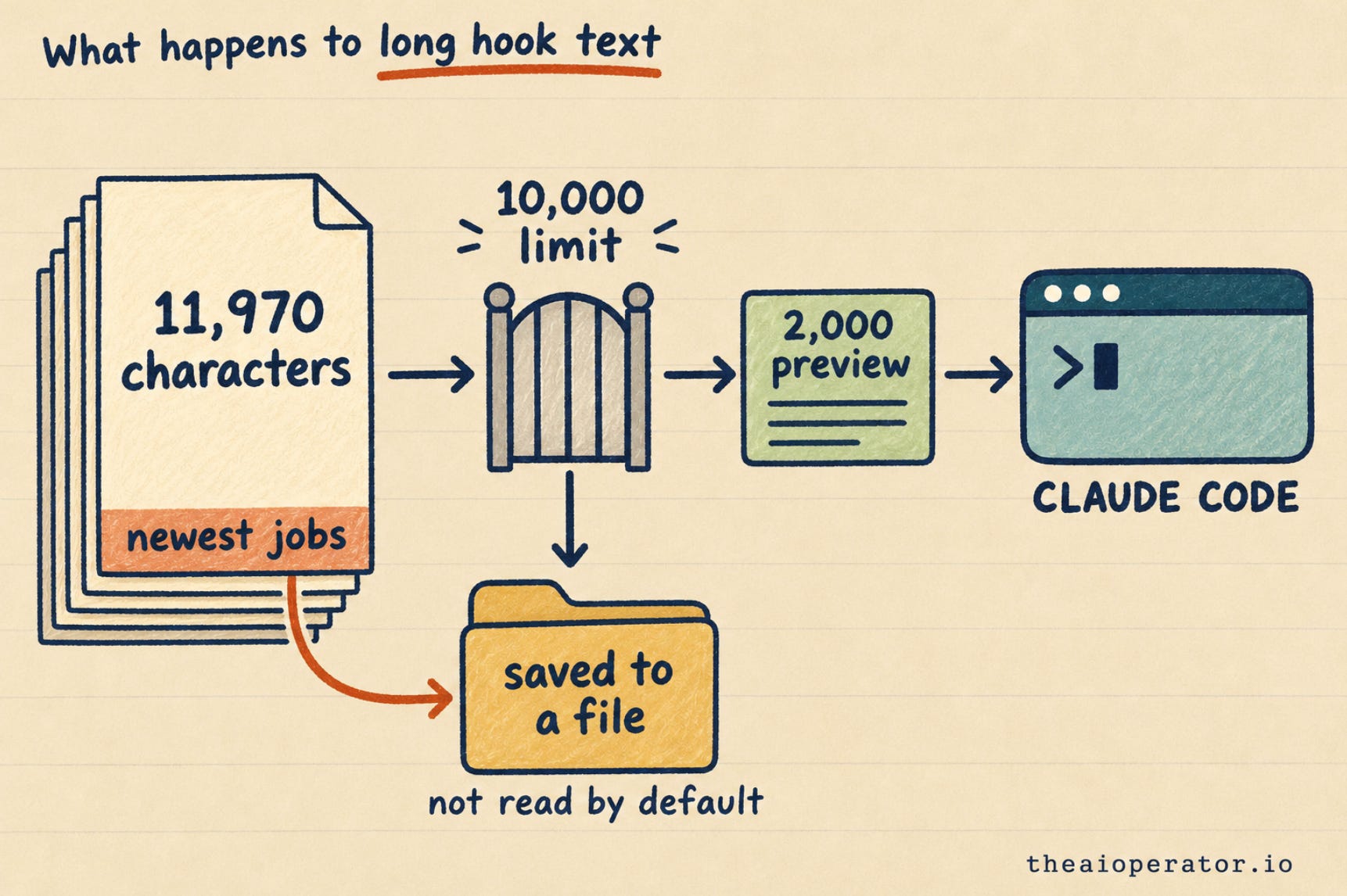
Claude Code’s hooks guide sets one limit on hook text: 10,000 characters per hook. Past that:
Claude Code saves the full text to a file.
Claude gets the file path and a preview of up to 2,000 characters.
No setting raises the limit.
The guide puts it plainly: “Claude Code doesn’t ask Claude to read the file.”
So Claude reads the first 2,000 characters and moves on. It doesn’t know what it missed. If your newest notes sit at the bottom, they go first.
People have reported this on GitHub since June. One report, issue 70460, was closed as “not planned” in August. Another, issue 84021, is still open.
How my second brain hit it
My repo has a part called Crew. It’s one shared logbook for my AI agents. Claude Code, Codex, Cursor and Grok Bot each write down what they did, so the next agent knows.
When a Claude Code session starts, a hook reads the unread lines and hands them to Claude.
The hook printed the last 50 unread lines. Jobs were stored first and lessons after them. Once 50 lessons piled up, the list held only lessons. Most were already decided.
Here’s what I measured:
Size: 11,970 characters, past the limit.
Jobs: 0 of the 20 newest jobs in the text.
Lessons: 50 lines, 35 of them already decided.
Claude got a 2,000-character preview of old lessons. The work my other agents did that day never reached it. No error showed up anywhere. A user found it and reported it as issue 397 on my repo.
Where Claude Code memory gets cut
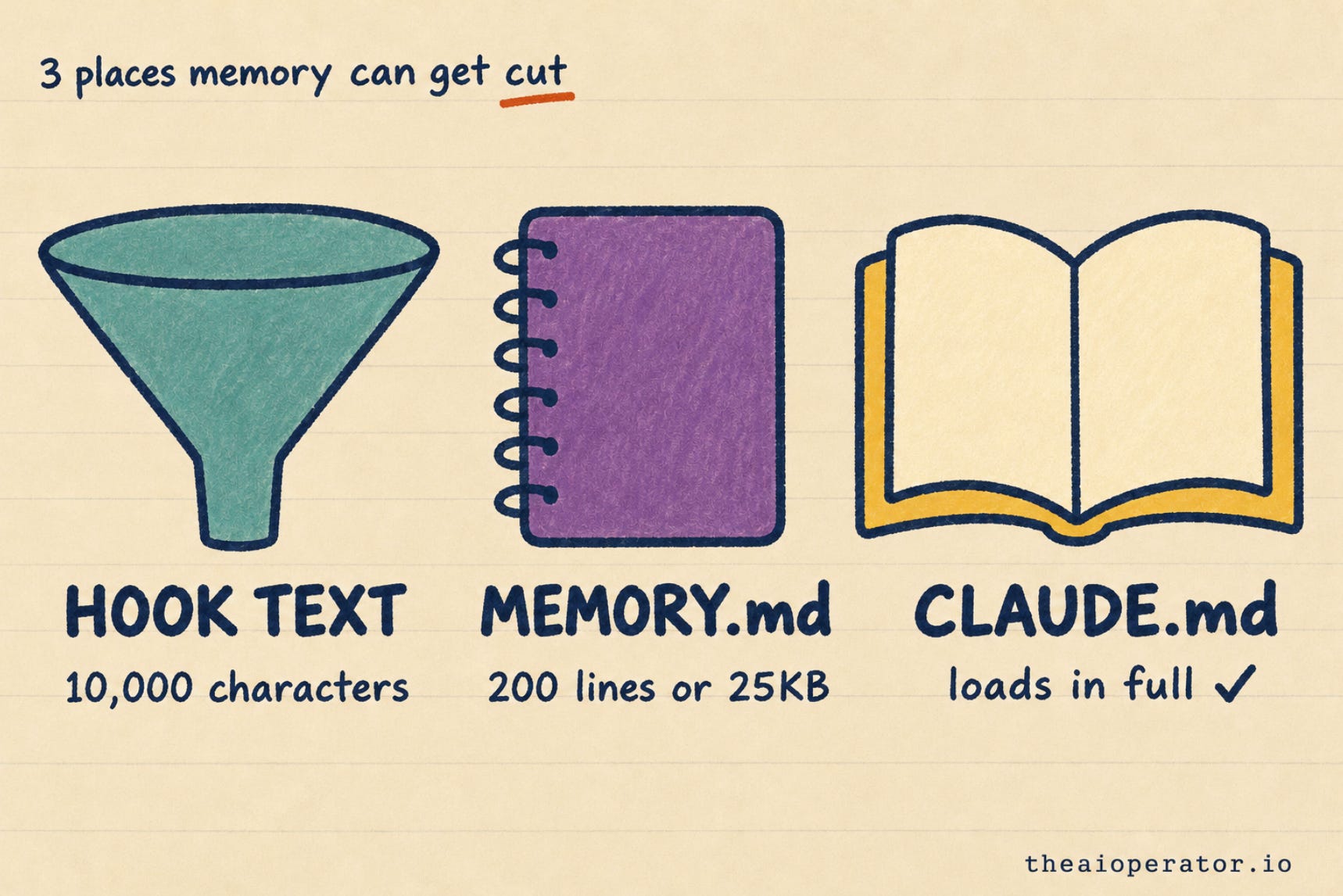
Hook text is one place. Claude Code’s two memory files have their own rules:
Hook text: 10,000 characters per hook. Past that, a 2,000-character preview.
Auto memory (MEMORY.md): the notes Claude writes for itself. Only the first 200 lines or 25KB load each session.
CLAUDE.md: the rules you write. The memory guide lists no cut. It suggests under 200 lines per file, because longer files make Claude follow them less well.
This morning my own session loaded only part of my MEMORY.md. The file was 24.7KB, and the last 2 of 130 lines were cut. Same pattern: the newest lines sit at the bottom, so they go first.
What I changed
The fix is pull request 414, merged on November 16. It does four things:
Newest jobs first. Recent work from other agents leads the list.
Decided lessons stay out. Only open ones show.
Under the limit. The text stays below 10,000 characters.
Quiet when empty. With nothing new, the hook prints nothing.
The result:
Before: 11,970 characters, 0 of 20 jobs seen.
After: 4,906 characters, 20 of 20 jobs seen.
All 1,324 tests passed.
An older fix in the same repo handles the other case. My vault’s rule file is 13,265 characters, too big for a hook. The hook no longer pretends. It tells Claude to read the file in full, and suggests a CLAUDE.md import, which loads the whole file.
If you use Crew, update the repo and run /crew setup again to get the fix.
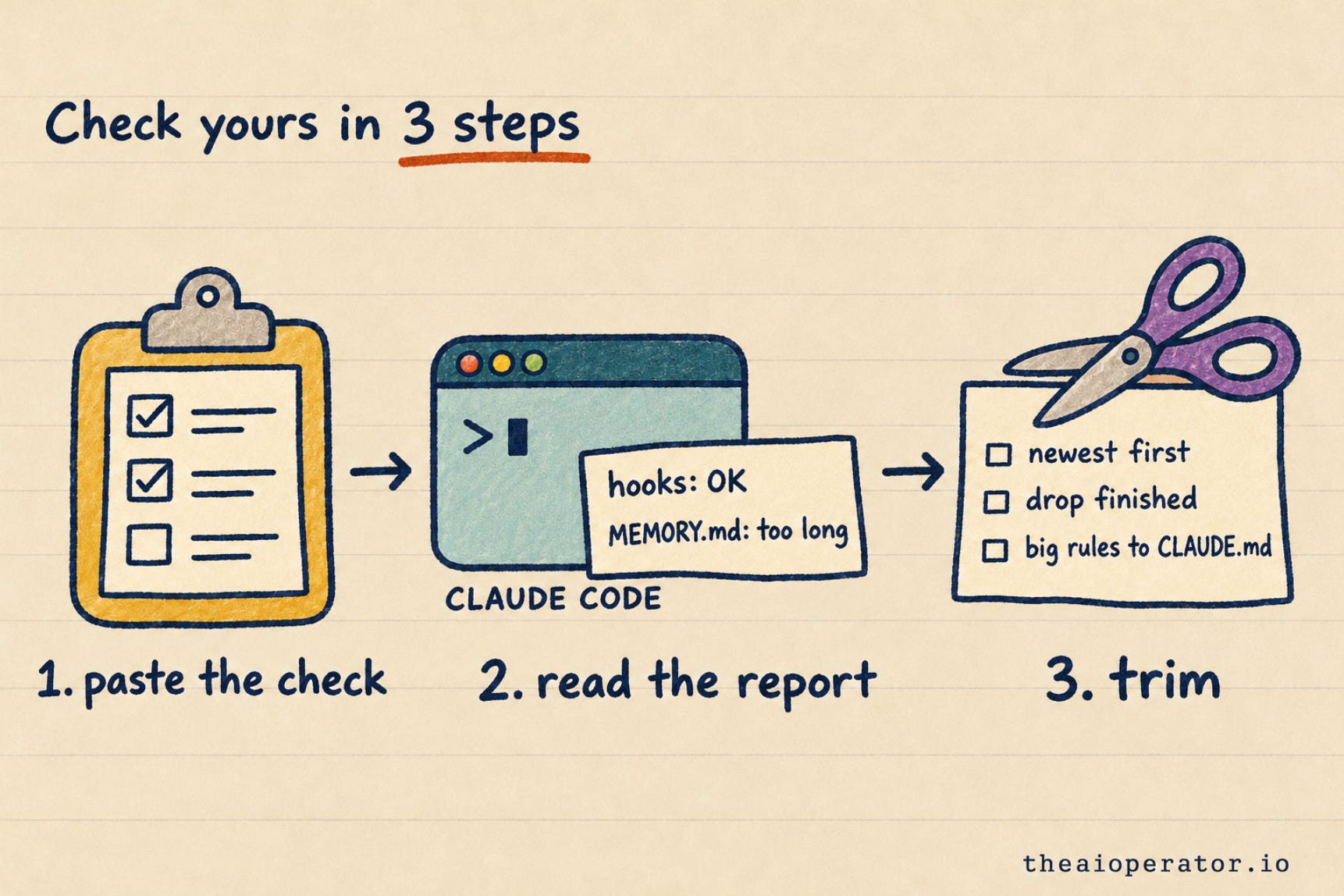
How to check your own setup
This takes 5 minutes. It works with any memory setup.
Step 1: run the check
Start a new Claude Code session in your project. Paste this as your first message:
Check if my memory reaches you in full. Read only. Do not change any file.

1. Hooks: look at the text my hooks gave you when this session started. For each one, tell me if you got it in full, or only a file path and a short preview.
2. Auto memory: find MEMORY.md for this project. Give its size in KB and its line count. Flag it if it is over 180 lines or 22 KB.
3. CLAUDE.md: list every CLAUDE.md you loaded, with its line count. Flag any over 200 lines.
4. For each flag, suggest the smallest fix: newest items first, drop finished items, or move long rules into CLAUDE.md.
It only reads. It changes nothing.
Step 2: read the report
I ran it on my own machine this morning, before publishing. It found two cuts:
Crew hook: path and preview only. 11.5KB went in, 2KB got through. My installed copy dated from October. I had merged the fix but never reinstalled it.
MEMORY.md: 24.7KB and 130 lines. The last 2 lines were cut.
CLAUDE.md files: 100 and 82 lines. Both fine.
Two cuts I didn’t know about, on the setup I maintain.
What each flag means:
A hook with “preview only”: it’s over the limit. Claude is missing most of it.
MEMORY.md near 200 lines or 25KB: the next new lines will be cut.
A CLAUDE.md over 200 lines: it still loads, but Claude follows it less well.
Step 3: fix what it flags
These are the same four rules I used:
Newest first. Put the most recent items at the top, so a cut takes the oldest.
Drop what’s done. Finished tasks and decided items don’t need to load every session.
Split big hooks. The limit counts each hook on its own. Two small hooks get through where one big one doesn’t.
Move rules to CLAUDE.md. Rules Claude must always follow belong in CLAUDE.md or an import, not in hook text.
Then start a new session and run the check again. Every line should come back “in full”.
Want the ready-made version? The Vault has AI tools for paid members, each set up in 10 minutes or less.
Frequently asked questions
What is the Claude Code hook output limit?
10,000 characters per hook. Past that, Claude Code saves the text to a file and shows Claude a preview of up to 2,000 characters.
Why does Claude Code forget things at the start of a session?
Its memory may have been cut. Hook text over 10,000 characters and MEMORY.md past 200 lines or 25KB both lose their ending, and new notes get added at the end.
How much of MEMORY.md does Claude Code load?
The first 200 lines or 25KB, whichever comes first. The rest doesn’t load at session start.
Can I raise the 10,000-character hook limit?
No. Claude Code’s hooks guide says no setting or environment variable raises it.
Does Claude read the saved file?
It can, but Claude Code doesn’t ask it to. Claude works from the preview.
Does CLAUDE.md have a size limit?
The memory guide lists no cut for CLAUDE.md. It suggests under 200 lines per file, because longer files make Claude follow them less well.
Key takeaways
Claude Code keeps only 10,000 characters of each hook’s text and shows Claude a 2,000-character preview of the rest.
No setting raises the hook limit, and Claude Code doesn’t ask Claude to read the saved file.
Auto memory loads only the first 200 lines or 25KB of MEMORY.md.
Cuts take the end of the text, where new notes get added.
My second brain sent 11,970 characters and 0 of 20 new jobs. After the fix, 4,906 characters and 20 of 20.
Put the newest items first, drop finished ones, and keep must-follow rules in CLAUDE.md.
Further reading
About the author
I’m Eugeniu Ghelbur. I build AI agent systems and the tooling around them, and I write The AI Operator. I maintain obsidian-second-brain, an open-source Claude Code skill that runs an Obsidian vault as a living second brain. It’s MIT-licensed and starred by over 5,300 people on GitHub.
Such an interesting find!
I wish Anthropic would do a better job at documenting their product. Or pay us to do so 😂
I use Claude projects. My setup is as follows to minimize session start risks:
- bootstrap in project instructions
- read from project knowledge first then the instruction (claude.md or other) and fallback to claude.md (mine is in the cloud)
- bootstrap validates each instruction section was captured (~10, on exact string match so no approximation)
- once read, confirmation message that includes the EOF marker in claude.md (last line)
It doesn’t address the 10k but it provides a welcome read receipt to a business user.